
Donators' Privilege: Download the whole set in one click |
Privilège des Donateurs: Téléchargement du set en un clic
All the files of the set can be downloaded for free below, one by one. |Tous les fichiers du set peuvent être téléchargés gratuitement un par un ci-dessous.

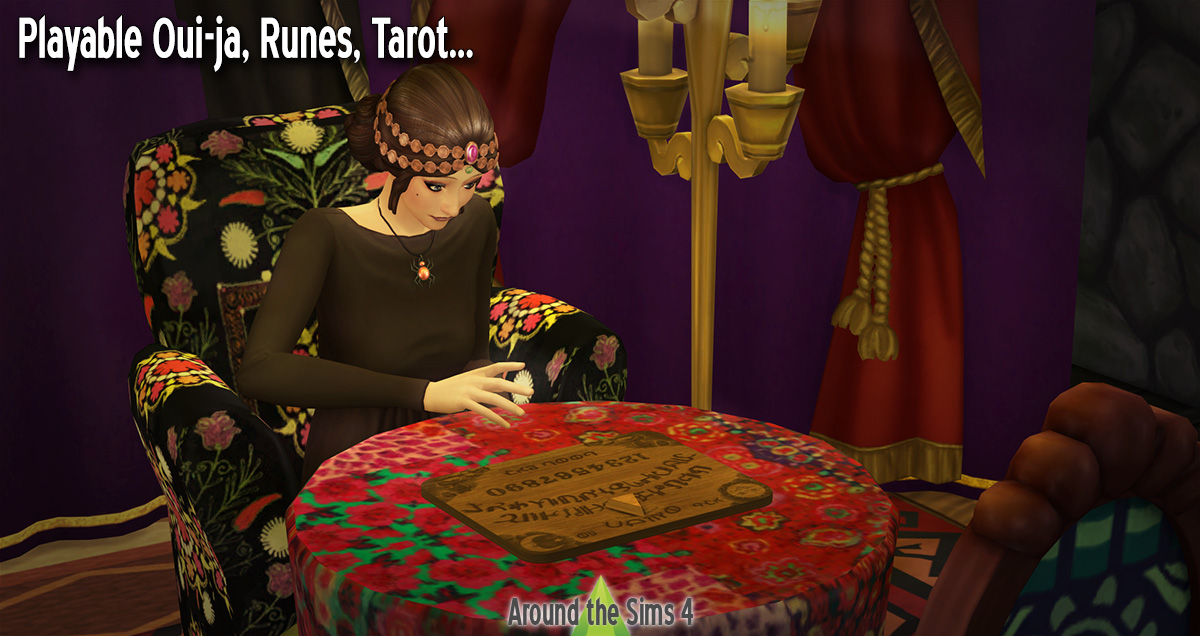
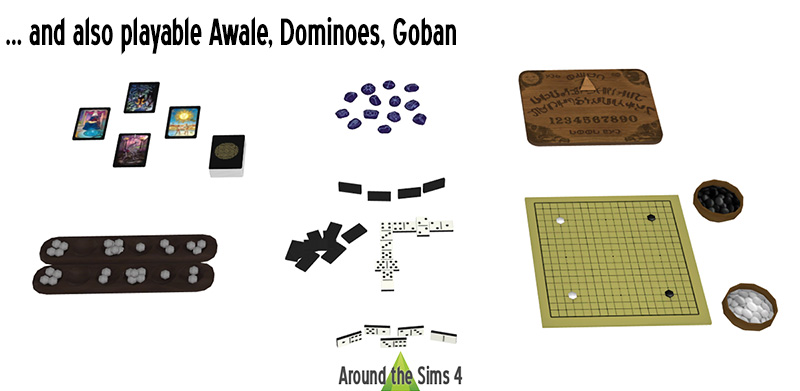
Here's some objects cloned from the chessboard, so you can simulate a game between your Sims (dominoes, awale, go game), or a consultation, if you use the esoteric objects (Tarot cards, Oui-ja board, runes). |
| Voici quelques objets basés sur l'échiquier ce qui permet à vos Sims de jouer tout en travaillant leur logique (dominos, jeu de go et awale), mais vous pouvez aussi simuler une consultation en voyance/spiritisme (cartes de tarot, oui-ja, runes). |
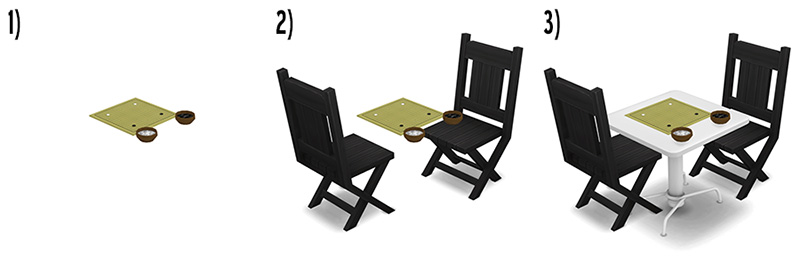
1) Choose a board game from the Buy Catalog, under Activities/Recreation
2) Place chairs around the game, and check that they "stick" to it, by moving the game board: chairs should move with.
3) Type "bb.moveobjects" in the cheat window (open it by pressing Ctrl-Shift-C), and place a table of your choice under the game.
4) Turn off the moveobjects code by typing it again.
2) Place chairs around the game, and check that they "stick" to it, by moving the game board: chairs should move with.
3) Type "bb.moveobjects" in the cheat window (open it by pressing Ctrl-Shift-C), and place a table of your choice under the game.
4) Turn off the moveobjects code by typing it again.
--
1) Choisissez un jeu depuis le Mode Achat, dans le catalogue Activités/Récréation
2) Placez des chaises auour du jeu en vous assurant qu'elles y "collent": déplacez le jeu, les chaises devront suivre si elles sont correctement placées
3) Tapez "bb.moveobjects" dans la fenêtre de code (que vous appelez en tapant Ctrl-Maj-C), et placez la table de votre de choix sous le jeu.
4) Désactivez le code moveobjects en retapant le code.
2) Placez des chaises auour du jeu en vous assurant qu'elles y "collent": déplacez le jeu, les chaises devront suivre si elles sont correctement placées
3) Tapez "bb.moveobjects" dans la fenêtre de code (que vous appelez en tapant Ctrl-Maj-C), et placez la table de votre de choix sous le jeu.
4) Désactivez le code moveobjects en retapant le code.
| Oui-ja New mesh in 2 variations designed by Sandy |
 |
 |
| Made with: TSR Workshop - Sims 4 Studio Uploaded the: 2019, October 4th Updated the: 2025, September 12th |
| Tarot New mesh in 3 variations designed by Sandy |
 |
|
| Made with: TSR Workshop - Sims 4 Studio Uploaded the: 2019, October 4th Updated the: 2025, September 12th |
| Runes New mesh in 3 variations designed by Sandy |
 |
|
| Made with: TSR Workshop - Sims 4 Studio Uploaded the: 2019, October 4th Updated the: 2025, September 12th |
| Awale New mesh in 1 variation designed by Sandy |
 |
|
| Made with: TSR Workshop - Sims 4 Studio Uploaded the: 2019, October 4th Updated the: 2025, September 12th |
| Dominoes | Dominos New mesh in 1 variation designed by Sandy |
 |
|
| Made with: TSR Workshop - Sims 4 Studio Uploaded the: 2019, October 4th Updated the: 2025, September 12th |
| Go game | Jeu de go New mesh in 1 variation designed by Sandy |
 |
|
| Made with: TSR Workshop - Sims 4 Studio Uploaded the: 2019, October 4th Updated the: 2025, September 12th |